«30 9 * * 1-5» — read it, write it, trust it before it runs
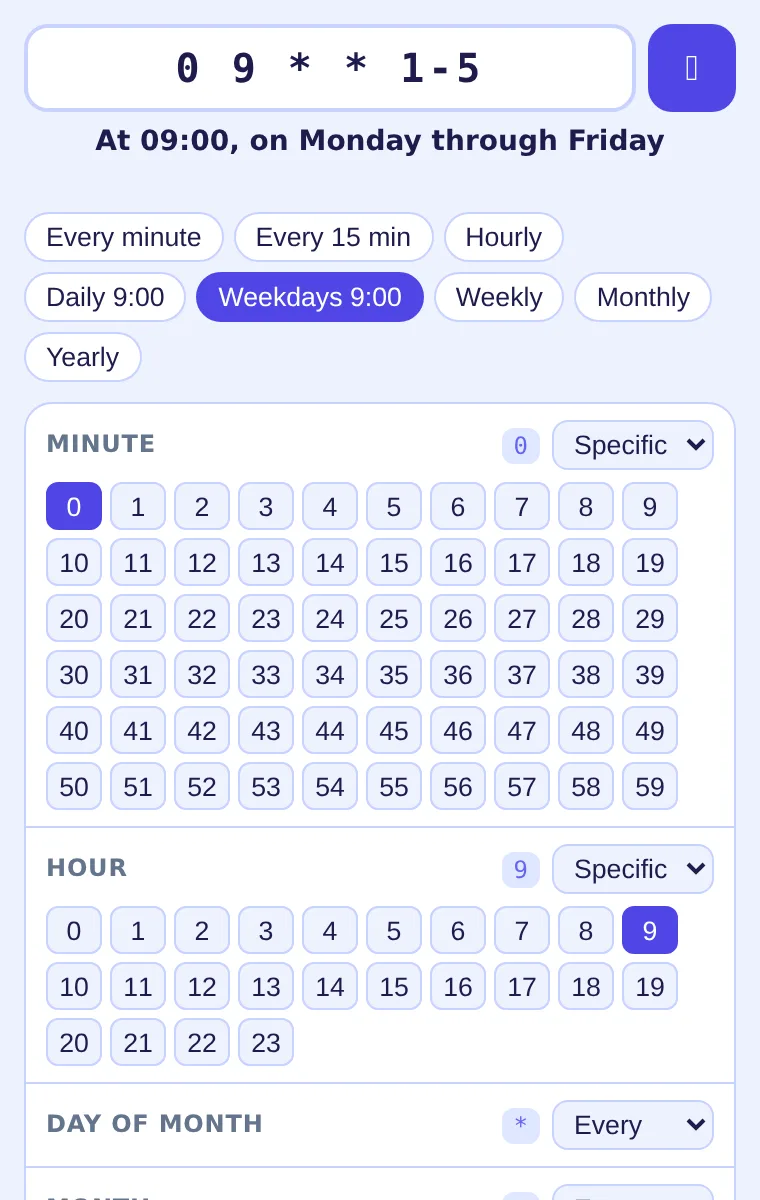
Pick minute, hour, day, month and weekday from menus and the cron string writes itself; paste any string and it reads back as a sentence with the next five run times. On the pages you work in, cron expressions explain themselves on hover.
Add Cron Builder to Chrome — free
- 5-field cron, lists, ranges, steps, L / W / #, names, @macros
- Next 5 runs in your timezone or UTC
- Works offline — nothing is sent anywhere
Which field is the weekday, and does 0 mean Sunday?
The job has to run on weekday mornings at half past nine. You open a crontab guide, count the asterisks, write `30 9 * * 1-5`, and still are not sure whether the CI server reads it in UTC or whether `*/15` means «at :15» or «every fifteen». The reviewer looking at the YAML next week has the same questions, and the one website that explains cron is a tab you have to leave the editor for.
Pick instead of typing
Start from a preset — hourly, daily at a time, weekdays, monthly — then adjust each field: every, specific values, a range or a step. The expression updates with every click and a sentence under it says what it means.
Check the next runs
Five upcoming run times are listed in your timezone, or in UTC with one toggle — the way GitHub Actions and most servers read them. If the schedule never fires, it says so.
Copy, or just hover
Copy the expression into your workflow, CronJob or crontab. Afterwards, every cron string on the pages you read — docs, pull requests, Stack Overflow — is underlined; hover to see what it does and when it next runs.
What you walk away with
A cron expression you can explain in a review, the exact dates it will fire, and a page full of other people's schedules that are no longer opaque. Lists, ranges, steps, `?`, `L`, `W`, `#`, `MON`/`JAN` names and `@hourly`-style macros are understood. Parsing runs inside the extension; nothing from the page or your input leaves the browser, and the recent expressions are kept locally.
GitHub Actions nightly build
A developer adds `schedule:` to a workflow. Preset «daily at», hour set to 02:00, UTC on — the popup shows the next five nights, the string goes into the YAML.
Reviewing a Kubernetes CronJob
The pull request contains `0 */6 * * *`. The reviewer hovers it in the diff: «every 6 hours», next run in 3 hours. Approved without opening a cron site.
An old crontab nobody remembers
`45 23 L * *` on a backup server. Paste it into the popup: «at 23:45 on the last day of the month». Mystery over.
Compared with the usual ways of dealing with cron
| Online cron generator sites | A separate tab, ads, nothing for the expressions already in your code | Cron Builder: In the toolbar, plus hover explanations on any page |
|---|---|---|
| crontab guide / man page | Explains the grammar, not your specific string or its dates | Cron Builder: Reads your string back with the next 5 run times |
| Guessing and waiting | You find out at 02:00 whether it ran | Cron Builder: The run times are listed before you commit |
FAQ
How do I write a cron expression for every 5 minutes?
Set the minute field to «step», every 5 — the expression becomes `*/5 * * * *`. The popup confirms it as «every 5 minutes» and lists the next runs.
What does `0 9 * * 1-5` mean?
At 09:00 on Monday through Friday. Paste it into the popup or hover it on a page to see the same sentence and the next five dates.
Are the run times in UTC?
By default they are shown in your browser's timezone; tick «UTC» to see them the way GitHub Actions, Kubernetes and most servers evaluate them.
Which cron syntax is supported?
Standard 5-field cron: `*`, lists, ranges, steps, `?`, `L`, `W` and `#` basics, month and weekday names, and macros such as `@daily` or `@hourly`. Seconds-first 6-field Quartz strings are not parsed.
Does it send my expressions anywhere?
No. Parsing, explanation and run-time calculation happen inside the extension; recent expressions are stored locally. Building and decoding are free; copying the first few results is included and ExtSpace Pro removes that limit.

Cron Builder
Free Chrome extension to build a cron expression with pickers, read any cron schedule in plain English with the next 5 runs, and see cron strings explained on hover in GitHub Actions, Kubernetes and crontab pages.
Add Cron Builder to Chrome — free Headings — H1–H6 Outline for SEO
 Ping — Website Response Time